


Table of Contents
- Quick Comparison: Top CRMs for Mortgage Professionals
- Key Features Every Mortgage CRM Must Have
- Best CRM for Mortgage Loan Officers: Top Picks for 2026
- LoanSites: Best for Loan Officers Who Need a Complete Online Presence
- Jungo: Best for Salesforce Power Users
- Shape Software: Best for AI-Driven Lead Engagement
- BNTouch: Best for Transparent Pricing and Mobile Access
- HubSpot CRM: Best Free Option for Solo Loan Officers
- Floify: Best for Document Collection and Borrower Experience
- Mortgage CRM Integration with LOS: What to Look For
- Automated Mortgage Lead Follow-Up Scripts That Convert
- Best Practices for Mortgage CRM Implementation
- Total Cost of Ownership: What You’ll Actually Pay
- Conclusion
- Frequently Asked Questions
Last Updated: September 10, 2026
Quick Comparison: Top CRMs for Mortgage Professionals
Finding the best CRM for mortgage loan officers comes down to matching your workflow to the right platform. This guide from LoanSites breaks down ten mortgage-specific and general-purpose CRMs.
A mortgage CRM tracks borrower leads, automates follow-up, and manages the loan lifecycle from first contact to closing. Mortgage-specific CRMs add LOS integration, compliance-aware workflows, and referral tracking that generic sales tools lack.
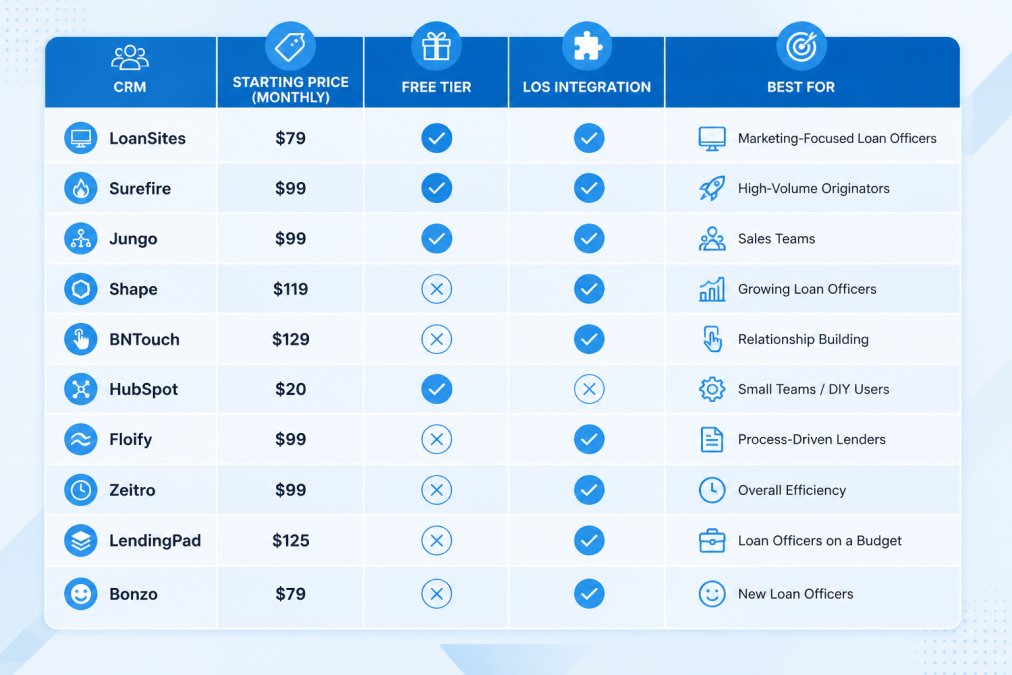
Here’s how the top options compare at a glance:
| CRM | Starting Price | Free Tier | LOS Integration | Best For |
|---|---|---|---|---|
| LoanSites | See pricing page | No | Via AI Live Chat and CRM tools | Loan officers needing a complete online presence |
| Surefire CRM | Contact for pricing | No | Yes | Marketing automation at lenders |
| Jungo | Contact for pricing | No | Yes | Salesforce power users |
| Shape Software | Contact for pricing | No | Yes | AI-driven lead engagement |
| BNTouch | $95/month | No | Yes | Transparent pricing and mobile access |
| HubSpot CRM | Free | Yes | Limited | Solo loan officers on a budget |
| Floify | Contact for pricing | No | Yes | Document collection |
| Zeitro | Contact for pricing | No | Yes | Non-QM and specialty workflows |
| LendingPad | Contact for pricing | No | Built-in LOS | CRM and LOS in one system |
| Bonzo | Contact for pricing | No | Partial | High-touch text and email follow-up |
Key Features Every Mortgage CRM Must Have
The features that separate a mortgage CRM from a generic contact database are lead capture, pipeline visibility, and a borrower-facing portal that keeps documents and status updates in one place. Miss any of these and you’ll be back to spreadsheets within a month.
Lead Capture and Pipeline Management
Lead capture pulls borrower inquiries from your website, landing pages, and referral partners into a single queue. Pipeline management moves each lead through defined stages, new inquiry, pre-approval, underwriting, closing, with task reminders at each step. The best platforms let you customize those stages to match how your shop works.
Borrower Portal and Document Management
A borrower portal gives clients a secure login to upload pay stubs, tax returns, and bank statements, check loan status, and e-sign disclosures. Back-end document management keeps every file tied to the right loan. Floify built its reputation on this function, and most mortgage-specific CRMs now include a version of it.
Best CRM for Mortgage Loan Officers: Top Picks for 2026
Each pick below earns its place for a specific type of loan officer. Read the “best for” line first, then dig into the details.
LoanSites: Best for Loan Officers Who Need a Complete Online Presence
LoanSites is the top pick for loan officers who want their CRM, website, and lead generation working as one system. The platform pairs a custom-built mortgage website with AI Live Chat and CRM tools that capture and nurture borrower inquiries automatically.
What sets LoanSites apart is lead generation and relationship management in one package. Advanced SEO drives traffic, AI Live Chat engages visitors the moment they land, and the built-in CRM tracks every conversation through to application. The website is ADA-compliant, reducing legal exposure at a time when accessibility lawsuits against financial services sites are common.
Where it stands out: unlimited support and unlimited customization are included with the website package, so your site evolves as your business does.
Loan officers and small brokerages that want a lead-generating website, SEO, AI chat, and CRM from one provider without managing four separate vendors.
Jungo: Best for Salesforce Power Users
Jungo runs on the Salesforce platform, so anyone comfortable in that ecosystem will feel at home. Automated mortgage marketing campaigns, co-marketing tools for real estate agents, and enterprise-grade reporting are built in. The tradeoff is setup complexity: configuration takes longer and often requires a dedicated admin, so smaller shops may find the overhead hard to justify.
Shape Software: Best for AI-Driven Lead Engagement
Shape emphasizes native AI tools for lead engagement and automated LOS synchronization, with customizable pipelines that adapt to different loan products. The interface is cleaner than older mortgage CRMs, but advanced automation carries a learning curve, budget onboarding time to use the AI tools fully.
BNTouch: Best for Transparent Pricing and Mobile Access
BNTouch publishes a starting price of $95 per month, rare in this category, and includes a mobile app for managing loans from the field. Automated borrower follow-up sequences and a partner portal for real estate agents round out the feature set. A one-time activation fee applies on top of the subscription.
HubSpot CRM: Best Free Option for Solo Loan Officers
HubSpot’s free tier covers contact management, deal pipelines, and email tracking, and the interface is the most intuitive on this list, a legitimate starting point for a solo loan officer. The catch: no mortgage-specific automation out of the box, no native LOS integration, and you build your own follow-up sequences.
Floify: Best for Document Collection and Borrower Experience
Floify is a point-of-sale and document collection system that functions as a lightweight CRM. Automated document tracking and a borrower portal for loan status updates are its core strengths. It is not a full-featured sales CRM, but if your bottleneck is document chasing rather than lead nurturing, Floify solves the right problem.
Mortgage CRM Integration with LOS: What to Look For
Mortgage CRM integration with LOS determines how much duplicate data entry your team does every day. The right integration syncs borrower records, loan status, and milestone dates automatically. The wrong one looks fine in a demo and then quietly drops status changes during underwriting, which is when borrowers call to ask why nobody updated them.
The Three Sync Mechanics That Actually Matter
Before you commit, get a straight answer on three things:
- Bi-directional sync: Changes in the LOS should appear in the CRM and vice versa. One-way sync creates blind spots, usually on the CRM side, where follow-up automation keeps firing based on a status the LOS abandoned two days ago.
- Field mapping control: Decide which fields sync and which stay local. A loan officer’s personal notes should not overwrite the LOS record, and underwriter condition codes should not clutter the borrower-facing pipeline view.
- Milestone triggers: Status changes in the LOS should fire automated follow-up in the CRM. This is where most “integrations” quietly fail. Ask the vendor to show a live loan moving from “Submitted to Underwriting” to “Conditional Approval” and confirm the CRM fires the right borrower message without manual intervention.
Compliance-Specific Workflows: The Integration Test Most Guides Skip
This is the part of LOS integration that separates a real mortgage CRM from a generic sales tool, and the part most “best CRM” articles never cover.
Mortgage origination is governed by federal rules touching every borrower communication: RESPA (referral fees, settlement disclosures), TILA/TRID (Loan Estimate and Closing Disclosure timing), ECOA and Regulation B (adverse action notices), and the SAFE Act (who may originate) (consumerfinance.gov). A CRM sending automated texts and emails on your behalf is functionally a marketing and servicing channel for a federally regulated transaction.
What to verify in any CRM you evaluate:
- Audit trails on every borrower touch. Every automated email, text, and call log should be timestamped, immutable, and tied to the loan file. If a regulator asks what the borrower was told on a specific date, you need a one-click answer, not a screenshot from a loan officer’s phone.
- Consent and opt-out tracking for TCPA. Automated texts require prior express consent and a working opt-out mechanism (fcc.gov). The CRM should record when consent was captured, through which channel, and honor STOP requests across every sequence.
- Adverse action and disclosure triggers. When a loan is denied or withdrawn, the CRM should suppress marketing sequences automatically. Nurturing a borrower who just received an adverse action notice is a compliance problem, not a marketing opportunity.
- Retention and recordkeeping. Federal rules require loan records to be retained for set periods (consumerfinance.gov). Confirm where CRM data lives, how long it is kept, and whether you can export a complete borrower communication history if you leave the platform.
- Role-based access. Assistants, processors, and marketing staff should not all see the same borrower data. Granular permissions are a compliance control, not a convenience feature.
A useful test: ask the vendor to walk through a hypothetical RESPA-sensitive scenario, a real estate agent referral that turns into a closed loan, and show how the CRM records the referral source, communications, and disclosure timeline. Vendors who can do this in a live demo are built for mortgage; vendors who pivot to “our marketing automation is best-in-class” are not.
Build vs. Bundle: The Strategic Trade-Off
LendingPad bundles CRM and LOS in one system, eliminating sync issues but locking you into a single vendor for both origination and relationship management. If the bundled LOS falls behind on investor or agency requirements, you cannot swap it without ripping out your CRM too.
For most independent loan officers, a CRM with solid LOS integration beats an all-in-one platform on flexibility, provided the integration passes the compliance and milestone tests above. The integration is the product; everything else is interface.
When you evaluate LOS integration, do not stop at “does it sync?” Ask: does it sync bi-directionally, does it fire milestone-based follow-up, and does it produce an audit trail a compliance officer would accept? The third question is the one that separates mortgage CRMs from sales CRMs.
Automated Mortgage Lead Follow-Up Scripts That Convert
Automated mortgage lead follow-up scripts work when they sound human and arrive at the right moment in the loan lifecycle. Adapt this framework to your CRM’s automation builder.
Day 0 (inquiry received):
“Hi [First Name], this is [Your Name] with [Company]. I saw your inquiry about [loan purpose] and wanted to reach out personally. Are you free for a quick 10-minute call this week to talk through your options?”
Day 2 (no response):
“[First Name], following up on my note. Rates moved this week, and I’d hate for you to miss a window that fits your budget. Reply with a good time and I’ll call you.”
Day 7 (value add):
“Hi [First Name], no pressure here. I put together a quick breakdown of what a [loan amount] loan looks like at today’s rates. Want me to send it over?”
Day 14 (referral ask):
“[First Name], I know timing isn’t always right. If you’re not ready now, I’m happy to be a resource whenever you are. And if you know someone house-hunting, I’d appreciate the introduction.”
The highest-converting follow-up sequences mix channels. A text on day 2 followed by an email on day 4 outperforms four emails in a row, because borrowers check texts faster and email gives you room for detail.
Best Practices for Mortgage CRM Implementation
Best practices for mortgage CRM implementation start with one rule: migrate data before you train anyone. Teams that import contacts after going live spend weeks reconciling duplicates and lose trust in the system on day one.
A workable rollout sequence:
- Export and clean your existing contact data, deduplicating by email and phone.
- Map your pipeline stages to the CRM’s default stages before customizing anything.
- Configure LOS integration and test the sync with two or three live loans.
- Build your first three follow-up sequences, no more.
- Train loan officers on those three sequences only, then expand after two weeks.
The most common implementation mistake is turning on every automation feature at launch. Teams that do this generate duplicate texts, missed handoffs, and confused borrowers. Start with three sequences and add one per week.
Total Cost of Ownership: What You’ll Actually Pay
Total cost of ownership for a mortgage CRM includes far more than the subscription line item: activation fees, integration costs, migration costs, and the staff hours spent on setup and administration. Most listicles quote only the subscription, which is why so many loan officers are surprised at the end of year one.
The Five Cost Buckets to Add Up
- Subscription. Per-user, per-month, or per-loan, the pricing model matters more than the number. A per-loan model punishes volume; a per-user model punishes growth. Match the model to how you originate.
- Activation and onboarding fees. Many mortgage-specific CRMs charge a one-time setup fee on top of the subscription. Get it in writing before you sign.
- LOS integration setup. Even when integration is “included,” configuration work, field mapping, milestone triggers, testing with live loans, is often billed as professional services. Get a fixed quote, not an hourly estimate.
- Migration. Moving borrower data out of your old system is the cost nobody quotes. See the migration section below.
- Admin and training hours. Someone on your team will build sequences, clean data, and train staff. At a three-person shop, that is real payroll, even if it never appears on an invoice.
Solopreneur vs. Multi-Branch: Two Different TCO Equations
A solo loan officer and a ten-branch brokerage should not be evaluating the same platform.
Solopreneur (1-2 users): The dominant cost is your time. A free or low-cost general-purpose CRM can work if you build your own follow-up sequences and accept no native LOS integration. The moment you lose leads to slow follow-up, the “free” CRM is the most expensive option on the list.
Small team (3-10 users): This is where mortgage-specific CRMs earn their subscription. Per-user pricing scales linearly, but automation and LOS integration replace hours of manual work per loan. Break-even is measured in loans closed, not dollars saved.
Multi-branch brokerage (10+ users): You are buying administration, role-based permissions, compliance audit trails, and cross-branch reporting. Per-user pricing can become the largest line item, so negotiate volume tiers and ask about branch-level reporting before you commit.
Migration: The Hidden Line Item
Switching CRMs is the part of TCO vendors do not put on the pricing page, and the part that most often blows the budget. A realistic migration involves:
- Exporting every contact, note, task, and document in a usable format (CSV is common; PDF-only exports are a red flag).
- Deduplicating by email and phone before import, because duplicate borrower records generate duplicate automated messages.
- Mapping custom fields, and accepting that some will not survive the trip.
- Rebuilding every automation, sequence, and template from scratch, because almost nothing transfers between platforms.
- Running both systems in parallel for two to four weeks on live loans until you trust the new one.
Budget staff hours for each step. Migration commonly takes two to three times longer than the vendor’s estimate, because the estimate assumes clean data and the reality is a decade of accumulated duplicates.
How to Compare Quotes Without Getting Burned
Ask every vendor the same five questions in writing:
- What is the all-in first-year cost, including activation, integration setup, and training?
- What is the per-user cost at 1, 5, and 15 users?
- What does migration support include, and what is billed separately?
- What happens to my data if I leave, can I export everything, and in what format?
- Which features are gated behind a higher tier, and what does that tier cost?
Platforms with transparent published pricing make this math easier; platforms that require a sales conversation make it harder, so ask directly before investing time in a demo.
LoanSites publishes its pricing on its website, and the website package includes unlimited support and unlimited customization, removing the per-change fees that quietly inflate TCO on template platforms. For a loan officer whose website is a primary lead source, that structure changes the math in a way a subscription-only comparison will never show.
The most expensive CRM is not the one with the highest subscription. It is the one you abandon in month four because migration went badly or the team never adopted it. Factor switching cost into the decision before you sign, not after.
Conclusion
Choosing the best CRM for mortgage loan officers is really a question of where your pipeline leaks today: lead capture, follow-up, documents, or online presence. Fix the leak that costs you the most loans first.
LoanSites is built for loan officers whose biggest gap is visibility and lead flow. A custom website delivered in 10 business days, advanced SEO, AI Live Chat, and an integrated CRM give you one system for attracting borrowers and managing them through closing, with unlimited support and unlimited customization included.
Schedule a call with LoanSites and see how a complete online presence changes your origination volume.
Frequently Asked Questions
What CRM do most mortgage loan officers use?
There is no single answer, as loan officers choose based on team size, budget, and workflow needs. Mortgage-specific platforms like Surefire CRM, Jungo, and Shape Software are popular among established professionals who need deep LOS integration and compliance features. For solo loan officers or those just starting out, HubSpot CRM offers a free tier that covers basic contact management and pipeline tracking. The best CRM for mortgage loan officers depends on whether you prioritize automation, affordability, or a complete marketing ecosystem.
How does a mortgage CRM integrate with a Loan Origination System?
Most mortgage-specific CRMs connect to major LOS platforms through built-in integrations or APIs. This sync keeps borrower data, loan status updates, and document milestones current across both systems, so you avoid manual data entry. When evaluating mortgage CRM integration with LOS, check whether the connection is native or requires third-party middleware. Native integrations typically update faster and reduce the risk of data mismatches. Ask providers for a list of supported LOS platforms and confirm your system is included.
What are the essential features of a mortgage-specific CRM?
A mortgage CRM should handle lead capture, pipeline management, automated follow-up, and borrower communication in one place. Look for LOS integration, document management, referral tracking, and compliance monitoring. Mortgage marketing automation, including email drip campaigns and interest rate alerts, helps nurture leads through the loan lifecycle. A borrower portal improves transparency and reduces inbound status calls. Reporting analytics should show lead conversion rates and pipeline health so you can adjust your approach based on real data.
How can automated mortgage lead follow-up scripts improve conversion?
Automated follow-up keeps you in contact with leads without manual effort. Effective automated mortgage lead follow-up scripts combine timely triggers (like a rate change or a website visit) with personalized messaging. A typical sequence might start with a text within five minutes of lead capture, followed by an email with a loan calculator link, then a call reminder for the loan officer. CRMs with built-in automation, such as Bonzo or Shape Software, handle this sequencing so no lead goes cold from neglect.
What is the difference between a general real estate CRM and a mortgage CRM?
A general real estate CRM focuses on property listings, showings, and buyer or seller pipelines. A mortgage CRM is built around the loan lifecycle: application, underwriting, closing, and post-close retention. Mortgage-specific platforms include LOS integration, compliance monitoring, and document management tailored to lending regulations. General tools like HubSpot can work for basic contact management, but they lack mortgage-specific automation out of the box. If your workflow involves loan milestones and rate alerts, a mortgage CRM saves time and reduces errors.


