


Table of Contents
- What Makes a Mortgage Website Builder the Best Fit for Brokers
- Mortgage Broker Website Design Best Practices
- ADA Compliant Mortgage Website Requirements
- Mortgage Broker Website Templates vs Custom Design
- Integration with CRM and LOS: What to Look For
- Cost Comparison of Website Solutions
- Frequently Asked Questions
Last Updated: September 11, 2026
What Makes a Mortgage Website Builder the Best Fit for Brokers
The best mortgage website builders for brokers are platforms that combine industry-specific compliance, lead capture, and seamless CRM or LOS integration rather than generic templates, and the top mortgage website builders treat those needs as the baseline. A 2026 market analysis from Webtonic’s mortgage marketing company review identified 47 mortgage marketing companies serving loan officers, a sign of how specialized this space has become. This guide from LoanSites breaks down what actually separates a high-converting broker site from a generic one, from compliance requirements to integration depth and long-term maintenance costs.
Here’s the core tension most buyers miss: the cheapest option rarely wins. A DIY builder might save money upfront, but mortgage websites carry regulatory and accessibility obligations that generic platforms were never designed to handle. The five areas below, features, design, compliance, integrations, and cost, are where that gap shows up fastest.
Key Features for Mortgage Websites
A mortgage website builder is a platform purpose-built to host a loan officer’s or broker’s site, with tools like mortgage calculators, application portals, and lead capture forms baked in. According to Freshy’s analysis of leading mortgage lending websites, the highest-converting sites in 2026 prioritize mortgage calculators and neighborhood-specific market data. Without those tools, visitors bounce to a competitor before ever requesting a rate quote.
The non-negotiable features are straightforward:
- Mortgage calculators for payment and affordability estimates
- A secure application portal with document upload
- Lead capture forms tied to an automated workflow
- Client portal access for tracking loan status
- Mobile-first design across every page
Lead Generation and Conversion Tools
Lead generation separates a brochure site from a working asset. Landing pages built for specific campaigns, paired with AI live chat and automated follow-up, keep prospects engaged after hours. LoanSites builds this into its custom mortgage website package, which includes AI Live Chat and CRM tools so loan officers can nurture borrower relationships without manually chasing every inquiry. The practical effect: fewer leads go cold because someone responded within minutes instead of days.
Mortgage Broker Website Design Best Practices
Design decisions drive conversion more than most brokers expect. A clean layout, prominent call to action, and fast load times matter more than decorative flourishes, especially when a borrower is comparing rates across three tabs at once.
Mobile-Responsive Design Requirements
Responsive design is not optional for mortgage broker website design best practices. Most borrowers research rates on a phone first, often during a commute or lunch break. A site that breaks on mobile loses that lead instantly. Mobile-first layouts, tap-friendly forms, and readable rate tables should be verified on actual devices before launch, not just resized in a browser window.
SEO and Local Search Optimization
SEO optimization determines whether borrowers find you at all. Local search matters most for brokers: someone searching for a mortgage professional in their area needs to see your branch, your reviews, and your service area clearly. Advanced SEO packages handle technical foundations like site speed, structured data, and location pages, while ongoing content keeps rankings from slipping. LoanSites offers a dedicated mortgage SEO package built around this exact problem.
ADA Compliant Mortgage Website Requirements
ADA compliant mortgage website requirements center on WCAG conformance: readable contrast, keyboard navigation, alt text on images, and accessible forms. Financial services sites face real legal exposure when they fail these standards, and demand letters are common. Building accessibility in from the start costs far less than retrofitting after a complaint arrives.
Skipping an accessibility audit before launch is the most common mistake brokers make. A single demand letter can cost more in legal fees than a full compliance-ready rebuild.
Compliance and Security Standards
Data security underpins every mortgage origination site. Encrypted forms, secure document upload, and clear privacy disclosures protect both the borrower and the broker. Compliance also extends to how rates and disclosures are displayed, since financial services marketing carries stricter rules than most industries. A site built without these guardrails creates risk that compounds with every lead captured.
Mortgage Broker Website Templates vs Custom Design
Template-based sites launch fast and cost less, but they cap how far a broker can differentiate. Custom design costs more upfront and pays off through better conversion, stronger branding, and room to add tools as the business grows.
DIY vs. Professional Agency Design
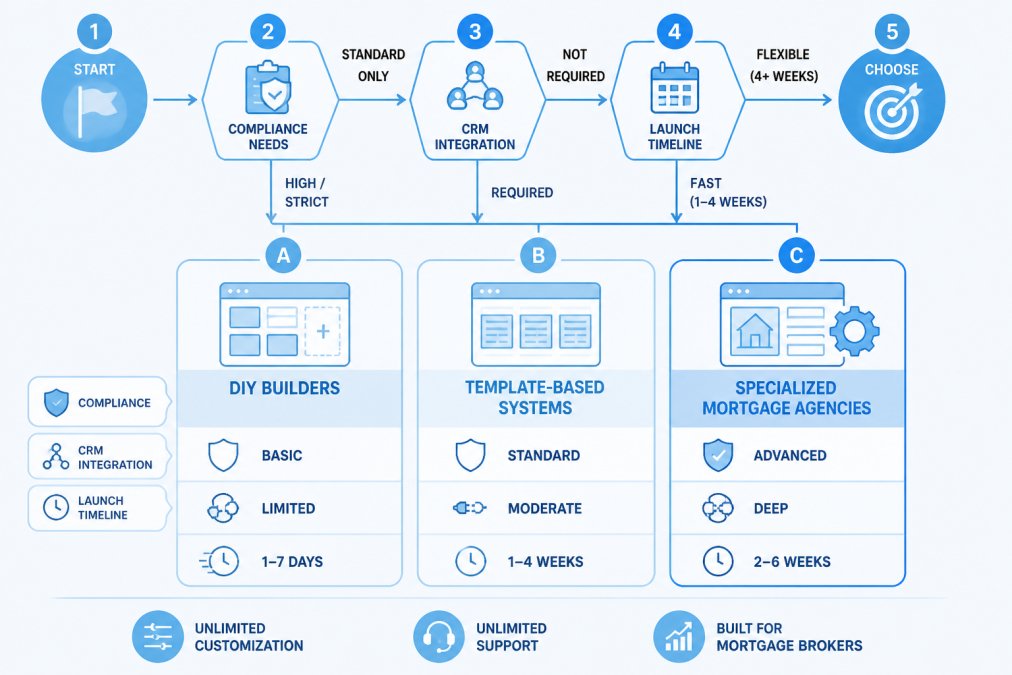
The DIY route works for a solo loan officer testing the waters. It falls apart once compliance, integration, or scale enters the picture. According to Roar Solutions’ 2026 platform comparison, brokers increasingly choose specialized providers over generic DIY builders specifically to ensure industry compliance and reliable lead generation. A professional agency brings compliance checklists, tested conversion layouts, and support that a template library cannot match.
| Approach | Launch Speed | Compliance Support | Customization | Ongoing Support |
|---|---|---|---|---|
| DIY builder | Fast | None built in | Limited | Self-managed |
| Template-based system | Moderate | Partial | Moderate | Vendor tickets |
| Specialized agency | 10 business days | Full | Unlimited | Included |
Integration with CRM and LOS: What to Look For
Integration compatibility decides whether your website becomes a workflow engine or another silo. A site that pushes leads directly into your CRM and syncs with your loan origination system eliminates duplicate data entry and speeds up response time.
Integration Compatibility Matrix
Before signing with any provider, ask three questions: Does it connect to my existing CRM, or does it require switching platforms? Does it push data to my LOS automatically? And can I export my lead data if I leave? LoanSites offers a dedicated CRM integration that connects with the tools brokers already use, rather than forcing a platform migration. The thing nobody tells you about integration is that “compatible” often means a manual CSV export. Test the actual data flow before launch, not after.
Cost Comparison of Website Solutions
Sticker price is the least useful number in this comparison. The real cost of a mortgage website is total cost of ownership over 24 months, and it breaks into five buckets: initial build, hosting and platform fees, compliance and accessibility work, integration setup and upkeep, and the staff hours absorbed by ongoing maintenance. Most brokers only price the first bucket and are surprised by the other four.
The Five Cost Buckets
1. Initial build. A DIY builder is the lowest upfront number. A template-based system sits in the middle. A custom build is the highest upfront number, and it is also the only one where the site is designed around your workflow instead of a generic layout.
2. Hosting and platform fees. DIY and template platforms typically charge a monthly or annual subscription that scales with features and traffic. Custom builds usually bundle hosting into the engagement. Either way, this is a recurring line item that should be in your 24-month math, not just year one.
3. Compliance and accessibility work. This is the bucket DIY buyers underestimate most. A WCAG 2.1 AA audit, remediation, consent logging, and a privacy policy review are real costs whether you pay a vendor or absorb them internally. On a template site, remediation is often more expensive because you are patching someone else’s markup.
4. Integration setup and upkeep. Connecting a CRM and an LOS is not a one-time task. APIs change, field mappings drift, and someone has to own the connection. If your builder requires a manual CSV export instead of a live sync, the “integration” is really a recurring labor cost disguised as a feature.
5. Maintenance hours. Rate changes, new landing pages, compliance updates, broken forms, and content refreshes all consume time. This is the bucket that decides the comparison, and it is the one most brokers never measure.
Post-Launch Maintenance ROI
Maintenance is where DIY savings quietly disappear. The honest way to compare providers is to estimate your own monthly maintenance hours, multiply by your fully loaded hourly cost, and add that to the subscription and hosting fees. A common pattern is that brokers underestimate their maintenance time by roughly half, the rate update that “takes five minutes” usually takes thirty once you account for testing, publishing, and verifying the disclosure language is still correct.
A site with unlimited support and unlimited customization absorbs that work without adding headcount, which is the model behind our custom website builds. The trade-off is straightforward: you pay more upfront, and in exchange the maintenance hours, compliance updates, and new landing pages are handled by the team that built the site rather than by you at 9 p.m. on a Friday.
Track your own hours for one month of site updates before choosing a provider. Log every rate change, form fix, and content edit. That single month of data will change the entire cost comparison more than any pricing page will.
How to Compare Providers Honestly
Ask every vendor the same five questions: What is the 24-month total, including hosting and support? Who owns compliance and accessibility remediation? Does the CRM and LOS integration sync live, or export manually? What happens to my data and my site if I leave? And how many hours per month should I expect to spend on maintenance? The provider that answers all five in writing is the one worth comparing on price.
Frequently Asked Questions
What features are essential for a high-converting mortgage broker website?
High-performing mortgage websites in 2026 prioritize mortgage calculators and neighborhood-specific market insights to drive conversion, according to Freshy. Other essentials include a clear call to action, lead capture forms, mobile-responsive design, and CRM integration. These tools help loan officers turn visitor traffic into qualified borrower leads and nurture relationships through the mortgage origination process.
Should mortgage brokers use DIY website builders or professional agencies?
DIY builders offer low-cost entry, but they often lack the specialized mortgage-industry compliance and lead-capture integrations provided by dedicated mortgage website agencies. Brokers increasingly choose specialized providers to ensure industry-specific compliance and lead generation. A professional agency also handles ADA compliance, SEO optimization, and ongoing technical support, which reduces legal exposure and saves time.
Are there specific ADA compliant mortgage website requirements?
Yes. Mortgage websites must meet Web Content Accessibility Guidelines (WCAG) to reduce legal exposure under the Americans with Disabilities Act. Key requirements include keyboard navigation, alt text for images, sufficient color contrast, and accessible forms. ADA-compliant design protects your business from lawsuits and ensures all borrowers can access your application portal and document upload tools.
How do mortgage website builders integrate with CRM and lead management tools?
Integration with CRM and LOS platforms varies by provider. Specialized mortgage website builders typically offer native integrations or API connections to popular CRM systems, enabling automated workflows, lead capture, and document upload directly from your site. DIY builders may require third-party plugins or custom development. Always verify compatibility with your existing CRM before choosing a platform to avoid managing two separate systems.
Choosing the wrong website platform costs more than money. It costs leads, compliance exposure, and months of rebuilding. LoanSites builds custom mortgage websites with unlimited support and unlimited customization, delivered in as few as 10 business days, with ADA-compliant design, advanced SEO, and AI Live Chat built in from day one. Schedule a call with LoanSites and get a site that works as hard as you do.


