


Table of Contents
- Why Mortgage Website Accessibility Matters in 2026
- Step 1: Run a Mortgage Website Accessibility Audit With the Right Tools
- Step 2: Fix the Elements That Break WCAG 2.1 Conformance
- Step 3: Make Mortgage Documents and Calculators Accessible
- ADA Compliance for Mortgage Websites: Managing Legal Risk
- Step 4: How to Write an Accessibility Statement for Mortgage Sites
- Your Mortgage Website Accessibility Checklist
- Frequently Asked Questions
Last Updated: September 15, 2026
Why Mortgage Website Accessibility Matters in 2026
According to BeAccessible’s 2026 web accessibility statistics, 94.8% of websites fail basic accessibility standards, and 5,114 ADA lawsuits were filed over web accessibility in a single year. For mortgage professionals, that gap is a legal and commercial liability. Learning how to improve mortgage website accessibility starts with one fact: your loan application, rate calculator, and disclosure documents are the highest-risk pages on your site. This guide from LoanSites breaks the work into four steps you can run this quarter.
The business case is not theoretical. AudioEye’s 2026 accessibility impact report found that 42% of organizations saw increased website traffic after prioritizing accessibility, and 35% reported better site navigation and user experience. Borrowers with visual, motor, or cognitive disabilities are a real segment of your pipeline, and they abandon inaccessible mortgage portals fast.
Accessibility is a conversion play before it is a compliance play. Fixing barriers removes friction for every borrower, not just those using assistive technology.
Step 1: Run a Mortgage Website Accessibility Audit With the Right Tools
A mortgage website accessibility audit is a structured review of your site against WCAG 2.1 success criteria, combining automated scans with manual testing on real borrower tasks. Start with the loan application and payment calculator, which carry the most form fields and interactive elements.
Automated Testing vs Manual Testing
Automated testing catches roughly a third of issues: missing alt text, insufficient color contrast ratios, unlabeled form fields, and empty links. Manual testing catches what scanners cannot: keyboard navigation traps, confusing tab order, and screen reader output that reads nonsense on a rate table.
Run both. Automated scans weekly, manual testing before every site release.
What to Test on Loan Application Forms and Calculators
Test these specific elements on every mortgage site:
- Application form fields have programmatic labels, not just placeholder text
- Error identification messages name the field and the fix
- Calculators announce results to screen readers when values change
- Document upload controls are operable by keyboard alone
- Required fields are marked in text, not color alone
The WebAIM Million report found home pages now carry an average of 1,437 elements, up 22.5% in one year. More elements means more places for accessibility to break, which is why page complexity is now the main obstacle to consistent WCAG conformance.
Step 2: Fix the Elements That Break WCAG 2.1 Conformance
Most conformance failures on mortgage sites come from a short list of repeat offenders. Fix these and you clear the majority of automated findings.
Alt Text, Headings, and Semantic HTML
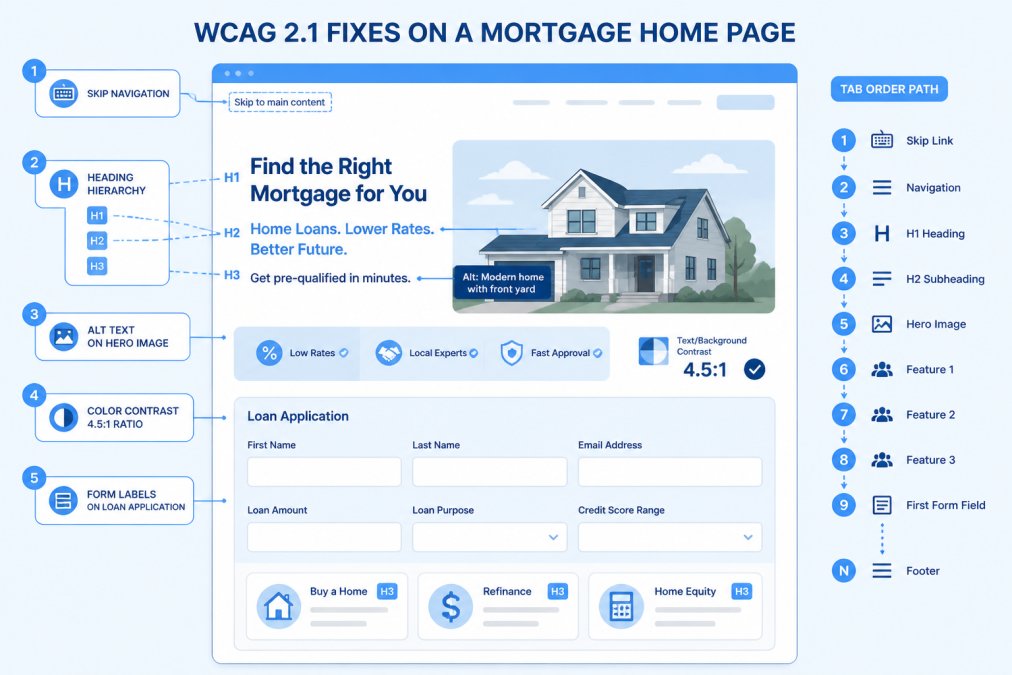
Alt text describes an image’s function, not its appearance. A rate chart needs “30-year fixed rate trend, 2021 to 2026,” not “chart.” Decorative images get empty alt attributes.
Heading structure matters just as much. One H1 per page, then H2 and H3 in logical order. Screen readers navigate by headings, so a loan page that jumps from H1 to H4 breaks the document object model for anyone using assistive technology.
Keyboard Navigation, Tab Order, and Form Labels
Keyboard navigation is where most mortgage sites fail hardest. Test your application by pressing Tab only. If focus disappears, lands on a hidden element, or skips the submit button, you have a WCAG 2.1 failure.
Add skip navigation links so keyboard users bypass the menu. Keep tab order matching visual order. Every input needs a visible label tied to it with a for attribute, plus aria labels where the visual design hides text.
Placeholder text is not a form label. When a field relies on placeholder text alone, the label vanishes the moment the borrower starts typing, and screen readers often skip it entirely.
Step 3: Make Mortgage Documents and Calculators Accessible
This is the step most generic accessibility guides skip, and it matters most in lending. A mortgage site can pass an automated scan on its home page and still fail a real borrower at the two moments that decide the loan: reading the disclosures and running the numbers.
Remediating PDF Disclosures at the Source
Mortgage documents are almost always distributed as PDFs, Loan Estimates, Closing Disclosures, promissory notes, title commitments, and appraisals. An untagged PDF is effectively a scanned image to a screen reader: it reads as one undifferentiated block, or as nothing at all.
The fix is not a converter. Most “PDF to accessible PDF” tools produce a file that passes a visual check and fails a screen reader pass. Remediate at the source instead:
- Tag structure first. Apply heading tags (H1 for the document title, H2 for major sections like “Loan Terms” and “Projected Payments”), paragraph tags, and list tags in the authoring tool, not after export.
- Set reading order explicitly. Multi-column Loan Estimates and side-by-side comparison tables frequently export with a reading order that jumps across columns. Verify the order in a PDF accessibility checker, not by eye.
- Define table headers. The Projected Payments table and the Closing Disclosure’s Calculating Cash to Close table need
<th>header cells with scope attributes so screen readers announce “Principal and Interest, $1,432” instead of a string of numbers. - Add alt text to embedded images. Appraisal photos, signature images, and rate charts all need functional alt text. A signature image should be marked decorative; an appraisal photo should describe the property condition shown.
- Set the document language and title. The PDF’s metadata title is what a screen reader announces first. “Loan Estimate, 123 Main St” beats “document (14).pdf.”
Keep tagged masters. When a disclosure template changes, re-tag the master rather than patching the exported file. Audit any shared drive of untagged legacy PDFs that gets re-uploaded every quarter, and either remediate or replace it.
A PDF that passes a visual check can still fail a compliance audit completely. Automated PDF checkers catch missing tags; only a screen reader pass catches a reading order that scrambles the Loan Estimate’s fee table.
Making Mortgage Calculators Screen-Reader Ready
Payment calculators, affordability calculators, and rate comparison tools are standard on mortgage sites and notoriously inaccessible. The failure modes are predictable:
- Sliders with no keyboard equivalent. A loan-amount slider that only responds to mouse drag excludes keyboard users entirely. Pair every slider with a numeric input, or make the slider operable with arrow keys and expose its value via
aria-valuenow. - Results that never announce. When a borrower changes the term from 30 to 15 years, the updated monthly payment must be announced.
Run a screen reader pass on your calculator with the display turned off. If you cannot complete a payment estimate using audio alone, neither can a borrower.
Third-Party Widgets and Vendor Tools
ADA Compliance for Mortgage Websites: Managing Legal Risk
Why Mortgage Sites Are a Target
A Practical Risk-Management Framework
| Risk Area | What Goes Wrong | Practical Fix |
|---|---|---|
| Loan application forms | Unlabeled fields, keyboard traps, no error identification | Manual keyboard and screen reader testing before each release |
| PDF disclosures | Untagged documents, scrambled reading order, undefined table headers | Remediate at source, keep tagged masters, audit legacy archives |
| Rate and payment calculators | Results not announced, mouse-only sliders, unlabeled inputs | Semantic HTML with live regions and keyboard-operable controls |
| Third-party widgets | Embedded rate tools and chat fail WCAG | Request VPATs, test embedded tools, document vendor commitments |
| Accessibility statement | Missing, stale, or vague | Publish conformance status, known limitations, and a feedback channel |
Documentation That Actually Helps
Working With Vendors and Third Parties
Legal risk drops when accessibility is a documented, ongoing practice with a named owner, not a project that ends when the audit report is filed.
Step 4: How to Write an Accessibility Statement for Mortgage Sites
Include these sections:
Your Mortgage Website Accessibility Checklist
Frequently Asked Questions
Can I be sued if my mortgage website is not ADA compliant?
Yes. 5,114 ADA-related website lawsuits were filed in 2026, according to BeAccessible, and financial services sites are frequent targets. Courts have generally treated websites as places of public accommodation under Title III of the ADA. The practical defense is documented WCAG 2.1 Level AA conformance, a published accessibility statement, and a record of remediation. A mortgage website accessibility program does not guarantee immunity, but it materially reduces exposure and gives you evidence of good-faith effort if a demand letter arrives.
Is WCAG legally required for mortgage lenders?
WCAG is not a statute, but it is the standard courts and the Department of Justice reference when evaluating ADA claims, and Section 508 applies WCAG 2.1 to federal agencies and their vendors. For mortgage lenders, the safe target is WCAG 2.1 Level AA. That covers the success criteria most often cited in settlements: text alternatives, keyboard access, color contrast ratio, form labels, error identification, and skip navigation links. Meeting Level AA also positions you for any future rulemaking that codifies it.
How does website accessibility impact SEO for loan officers?
The overlap is direct. Alt text, semantic HTML, heading structure, and descriptive link text are the same signals search engines use to understand your pages. AudioEye’s 2026 report found 42% of organizations saw increased website traffic after prioritizing accessibility, and 35% reported better site navigation and user experience. For loan officers, that means accessible mortgage calculators and application forms tend to rank better and convert better, because both crawlers and borrowers can parse them without friction.
What is an accessibility statement and why do mortgage sites need one?
An accessibility statement is a public page that names your conformance target (usually WCAG 2.1 Level AA), lists known barriers, explains how users can request accommodation, and gives a contact method for complaints. Mortgage sites need one because it is the first document a plaintiff’s attorney or compliance auditor checks. Include the date of your last audit, the tools used, and a realistic remediation timeline. Pair it with a documented mortgage website accessibility checklist so the statement reflects actual testing rather than a template copied from another site.


