


Table of Contents
- Mortgage Website Development Timeline: What to Expect in 2026
- What Actually Delays a Mortgage Website Launch
- Step-by-Step: How to Get Your Mortgage Website Live Faster
- ADA Compliance for Mortgage Websites: Time and Requirements
- Mortgage Lead Generation Website Tools That Speed Up ROI
- Template vs. Custom Mortgage Website: Which Takes Longer?
- Frequently Asked Questions
Last Updated: September 16, 2026
Mortgage Website Development Timeline: What to Expect in 2026
A mortgage website takes 10 business days to build on a fast-track custom schedule, while template-based builds stretch to 4-6 weeks and drag on longer once revisions pile up. That gap matters because your site is the first thing a borrower sees before they ever call you. At LoanSites, we have built hundreds of mortgage sites on a 10-business-day cycle, and the difference rarely comes down to design talent. It comes down to process. This guide breaks down how long a mortgage website takes phase by phase, what actually slows a launch, and how to compress the timeline without cutting corners on compliance.
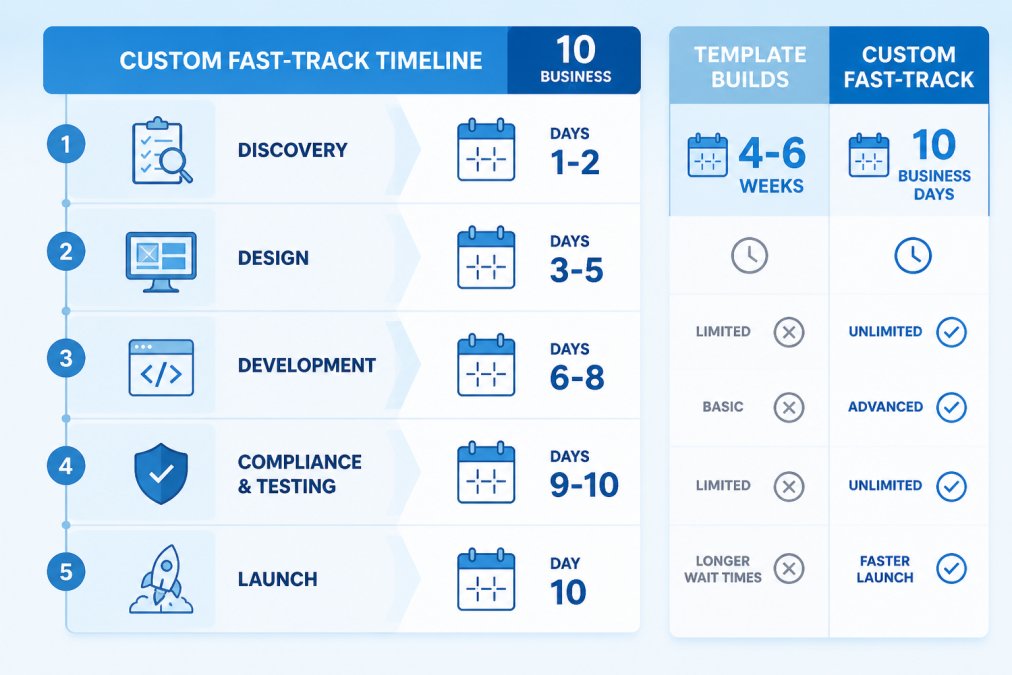
Typical Build Phases and Day-by-Day Breakdown
A custom mortgage website moves through five phases, and each one has a fixed window when the process is run properly. Discovery covers days 1-2: brand assets, loan programs, service areas, and licensing language get collected. Design runs days 3-5, where layouts and page templates take shape. Development occupies days 6-8, turning approved designs into working pages with forms, calculators, and integrations. Days 9-10 handle ADA compliance checks, mobile testing, and form validation. Launch happens on day 10.
| Phase | Days | What Happens | What You Provide |
|---|---|---|---|
| Discovery | 1-2 | Brand, programs, licensing review | Logo, NMLS info, service areas |
| Design | 3-5 | Page layouts and templates | Feedback within 24 hours |
| Development | 6-8 | Build, forms, integrations | CRM and chat access |
| Compliance and testing | 9-10 | ADA audit, mobile, forms | Final approval |
| Launch | 10 | DNS, indexing, go-live | Domain access |
The single biggest variable is not the build itself. It is how fast you return feedback and assets.
What Actually Delays a Mortgage Website Launch
Most delays trace back to three things: slow content approval, missing compliance documentation, and third-party integration bottlenecks. A site that should take 10 business days can stretch to six weeks when a loan officer takes four days to approve a homepage layout or forgets to send updated NMLS licensing language.
The pattern repeats across the industry. The Federal Reserve Bank of New York’s staff report on technology in mortgage lending found that technology adoption measurably reduces origination time, which tells you the bottleneck is rarely the software. It is the handoffs between people.
Documentation turnaround is the quiet killer. When your logo files, headshots, and licensing details arrive in a single organized folder on day one, the build stays on schedule. When they trickle in over two weeks, every downstream phase slips.
The most common mistake is treating compliance copy as an afterthought. If your state licensing disclosures are not finalized before development starts, you will rebuild pages after launch, and that adds days you cannot recover.
Step-by-Step: How to Get Your Mortgage Website Live Faster
Getting a mortgage website live faster comes down to preparation before kickoff and discipline during the build. The teams that launch in 10 business days are not lucky. They show up ready.
What You’ll Need Before Kickoff
- Company logo in vector format (SVG or AI)
- NMLS ID and state licensing numbers for every state you lend in
- Headshots and bios for each loan officer
- Service area list and branch addresses
- Loan program descriptions (conventional, FHA, VA, USDA, jumbo)
- Access credentials for your CRM and domain registrar
- Two to three competitor sites you like, with notes on why
Common Mistakes That Add Weeks
- Sending assets in dribs and drabs instead of one organized batch.
- Requesting major design changes after development has started.
- Skipping the ADA review until after launch.
- Waiting on legal to approve disclosures mid-build.
- Choosing a template platform that locks you into rigid page structures.
That last point is where most loan officers get stuck. A template product forces your brand into someone else’s layout, and every customization request becomes a support ticket with a queue. LoanSites builds custom sites with unlimited support and unlimited customization, so changes do not restart the clock.
ADA Compliance for Mortgage Websites: Time and Requirements
ADA compliance for mortgage websites adds roughly one to two days to a standard build when handled during development, and considerably more when retrofitted later. Compliance means screen-reader compatibility, sufficient color contrast, keyboard navigation, alt text on every image, and accessible form labels. The Web Content Accessibility Guidelines from the W3C set the technical standard most courts and regulators reference.
Retrofitting an existing site typically costs more time than building it right the first time. Accessibility lawsuits against financial services sites have climbed steadily, and a demand letter alone can cost more than a full rebuild. Building compliance into the development phase keeps the timeline intact and reduces your legal exposure.
Ask your developer for a written accessibility audit before launch, not a verbal assurance. A documented audit is your first line of defense if a demand letter ever arrives.
Mortgage Lead Generation Website Tools That Speed Up ROI
Mortgage lead generation website tools shorten the path from visitor to borrower, and the right stack can start producing leads within days of launch rather than months. The core tools are a rate calculator, a secure application form, AI live chat, and CRM integration. Each one removes a step where a borrower would otherwise drop off.
What most timeline articles miss is that these tools also change the build schedule itself. A site with a native rate calculator and a connected CRM takes longer to configure than a brochure site, but it produces leads on day one instead of day thirty. The trade-off is worth naming explicitly so you can plan for it.
| Tool | Build Impact | Time to First Lead |
|---|---|---|
| Rate calculator | Adds 1-2 days to development | Immediate on launch |
| Secure application form | Adds 1 day, requires encryption review | Immediate on launch |
| AI live chat | Adds 1 day, requires script training | Same day as launch |
| CRM integration | Adds 1-2 days, requires API credentials | Immediate on launch |
AI live chat is the highest-use addition. It answers rate and program questions at 2 a.m. when no loan officer is awake, and it captures contact details before the visitor leaves. When that chat connects to your CRM, every conversation becomes a tracked lead instead of a missed opportunity. The build cost is roughly a day of configuration plus a script review, and the payoff is coverage during the hours when most rate shopping happens.
Real-Time Status Tracking: What to Ask Your Loan Officer
A tool most borrowers never think to request is a real-time status view. The same principle applies to your website build: ask your vendor for a shared project board with a named owner for each phase, and you will never wonder whether the build is on track.
For borrowers, the equivalent question is direct: “Can you tell me which stage my file is in right now, and what the next action is?” A loan officer who can answer that in one sentence is running a tracked pipeline.
Before you sign with any website vendor, ask for a sample project board from a recent build. If they cannot show you one, the 10-day timeline is a sales number, not a process.
Contingency Impact: How Contract Timelines Interact With Your Website
A final angle most articles skip: the contingencies in a purchase contract create hard deadlines that your website should help borrowers understand. Inspection contingencies, appraisal contingencies, and financing contingencies each have their own clock, and the lender’s timeline has to fit inside them.
Template vs. Custom Mortgage Website: Which Takes Longer?
A template mortgage website launches faster on paper but usually takes longer in practice, because customization requests queue behind other customers and rigid layouts force compromises. A custom build runs on a defined 10-business-day schedule with no queue.
| Factor | Template Build | Custom Build |
|---|---|---|
| Initial launch | 4-6 weeks | 10 business days |
| Customization | Limited, queued | Unlimited, included |
| Ongoing support | Per-ticket fees common | Unlimited support |
| ADA compliance | Often bolted on | Built in |
| Brand fit | Constrained by template | Fully custom |
Frequently Asked Questions
What is the typical timeline for a custom mortgage website build?
A custom mortgage website typically takes 4 to 8 weeks with most agencies. Fast-track providers build in about 10 business days. The timeline depends on how quickly you supply brand assets, approve designs, and complete ADA compliance checks. Discovery and content collection usually take 3 to 5 days, design 5 to 7 days, development 5 to 10 days, and compliance testing 2 to 3 days. Delays happen when photos, licensing details, or legal disclaimers arrive late.
Does a mortgage website require special compliance features?
Yes. Mortgage websites must meet ADA accessibility standards under the Americans with Disabilities Act, which courts have applied to business websites. Required features include alt text on images, keyboard navigation, sufficient color contrast, screen-reader-friendly forms, and accessible PDFs. Skipping ADA compliance for mortgage websites increases legal exposure and can add weeks if retrofitted later. Build compliance into the initial design phase so it does not delay launch.
How long does it take to integrate lead generation tools into a mortgage site?
Mortgage lead generation website tools like AI live chat and CRM integrations usually take 1 to 3 business days to connect once the site is built. If your CRM uses standard APIs, integration is faster. Custom or legacy systems may need extra configuration. Plan for testing time so lead capture forms route correctly to your loan officers. Integrating tools before launch avoids a second deployment window.
Is it faster to use a template or a custom mortgage website design?
Templates can launch in a few days, but they limit customization and often need ADA remediation later. Custom builds take longer upfront but include unlimited customization and ongoing support, so updates do not require a new project. For loan officers who want a distinct brand and lead generation built in from day one, a custom mortgage website pays off faster than patching a template. Choose based on how much you plan to grow.


