


Table of Contents
- Why a Slow Mortgage Website Costs You Loans
- Mortgage Website Speed Optimization: Start With a Baseline
- How to Improve Core Web Vitals for Mortgage Sites
- Step-by-Step: How to Fix a Slow Mortgage Website
- Mortgage Lead Generation Website Tools That Help
- Common Mistakes That Keep Mortgage Sites Slow
- When to Rebuild Instead of Patch
- Frequently Asked Questions
Last Updated: September 13, 2026
Why a Slow Mortgage Website Costs You Loans
According to [Webtonic’s 2026 mortgage website(/lead-generation/best-mortgage-website-features-that-generate-leads/) benchmark analysis | webtonic.io], 68.9% of mortgage sites pass Core Web Vitals, which means roughly one in three does not. That gap matters because a slow mortgage website loses borrowers before your rates ever enter the conversation. At LoanSites, we build mortgage sites for a living, and the pattern is consistent: speed problems are rarely hosting problems. They are asset, script, and caching problems.
Industry data puts the average mortgage site conversion rate at 2.8% (Webtonic mortgage platform statistics). Speed alone will not fix that number, but a site that loads in six seconds will not even get the chance.
Below, we break down exactly how to fix a slow mortgage website: what to measure, what to change, and when patching stops being worth it.
Do not start by switching hosts. A common mistake is paying for premium hosting while shipping 4MB hero images and eleven tracking scripts. Fix the payload first, then the infrastructure.
Mortgage Website Speed Optimization: Start With a Baseline
Mortgage website speed optimization begins with measurement, not guesswork. You cannot improve what you have not benchmarked, and “it feels slow” is not a baseline.
Run every key template, not just the homepage. Rate pages, application forms, and loan officer bios all carry different weight.
Tools to Test Your Site Speed
- PageSpeed Insights for field and lab data on Core Web Vitals
- Chrome DevTools Performance panel for render-blocking requests
- WebPageTest for waterfall analysis on a throttled connection
- Google Search Console for real-user CrUX data across templates
Record three numbers per template: Largest Contentful Paint, Interaction to Next Paint, and Cumulative Layout Shift. Save them with the date. That snapshot becomes your before-and-after evidence.
How to Improve Core Web Vitals for Mortgage Sites
Improving Core Web Vitals for mortgage sites comes down to three metrics with hard thresholds. LCP measures how fast the main content paints (target: under 2.5 seconds). INP measures responsiveness to taps and clicks (target: under 200 milliseconds). CLS measures visual stability (target: under 0.1).
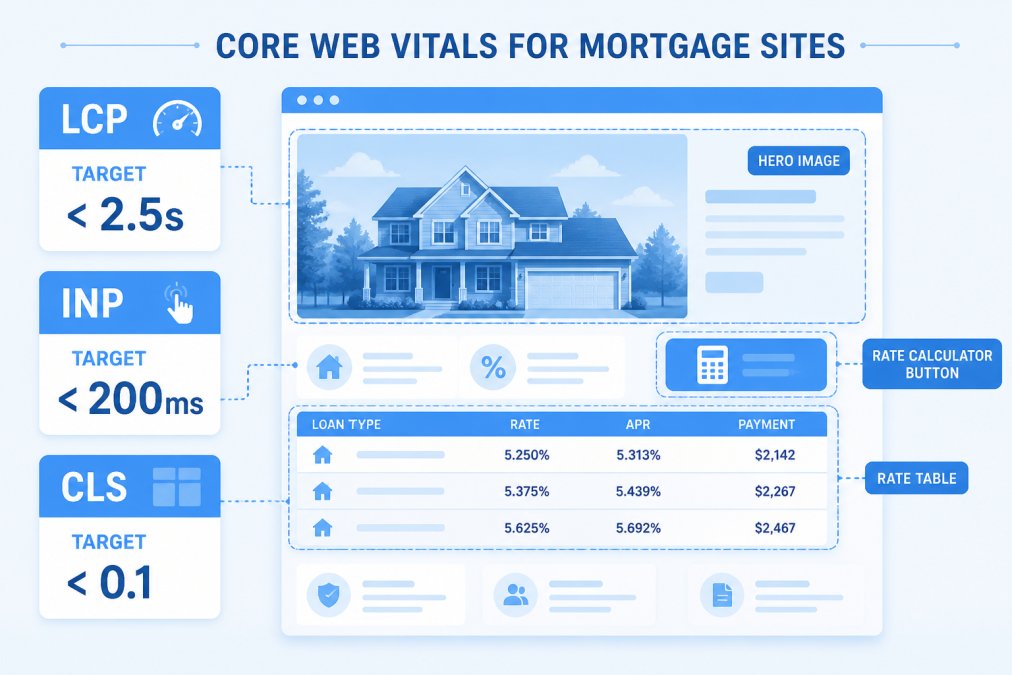
Fixing LCP, INP, and CLS on Your Mortgage Pages
The largest element on most mortgage pages is a hero image or a rate table. Compress the hero, serve it in WebP or AVIF, and preload it. For rate tables, render the first rows server-side so they paint immediately.
INP problems usually trace to third-party scripts competing with the main thread. Defer anything that is not needed for the first interaction.
CLS almost always comes from ads, chat widgets, or fonts loading late. Reserve fixed dimensions for every embed and use font-display: swap with a matched fallback.
Set a performance budget before you start: hero image under 200KB, total JavaScript under 300KB, and no more than five third-party scripts above the fold. Budgets stop the regressions that creep back in after launch.
Step-by-Step: How to Fix a Slow Mortgage Website
The fastest path to a faster site follows a fixed order: cut weight, then cut requests, then cache what remains. Skipping ahead wastes effort.
Step 1: Optimize Images and Media
Compress every image and convert to modern formats. A 3MB JPEG hero becomes roughly 150KB as a properly sized WebP. Lazy-load anything below the fold, and never lazy-load the LCP element.
Step 2: Reduce Scripts and Third-Party Code
Audit every script tag. Mortgage sites accumulate rate widgets, chat tools, analytics, and ad pixels that nobody has reviewed in a year. Remove what you cannot justify, defer the rest, and load chat only after user interaction.
Step 3: Enable Caching and Compression
Turn on browser caching for static assets, enable Brotli or Gzip compression, and use a CDN so assets serve from edge locations. For WordPress builds, a page-caching plugin handles most of this in one setting.
| Step | Typical Time | Expected Impact |
|---|---|---|
| Optimize images and media | 2-4 hours | Largest LCP gain |
| Reduce scripts and third-party code | 3-6 hours | Biggest INP gain |
| Enable caching and compression | 1-2 hours | Faster repeat visits |
Mortgage Lead Generation Website Tools That Help
Mortgage lead generation website tools only help if the underlying site is fast. A CRM or AI chat widget bolted onto a slow site adds weight and frustration rather than leads. The tools that actually move the needle are the ones that reduce friction between a borrower’s first click and a submitted application.
The practical stack is small and should be chosen for performance, not feature count:
- CRM to track borrower relationships and trigger follow-up sequences. The performance cost is usually a single script tag, but a poorly implemented CRM can inject multiple render-blocking requests. Ask vendors whether their snippet is asynchronous and whether it can be deferred until after first interaction.
- AI live chat to capture after-hours inquiries. Chat widgets are a common cause of layout shift and main-thread contention. Load them only after user interaction (scroll, click, or a few seconds of idle time) and reserve fixed dimensions for the container so CLS stays under 0.1.
- SEO tooling to bring qualified traffic. This is usually server-side or off-site and carries no front-end weight, but it only works if your rate pages and loan officer bios are indexable and fast. A slow template caps how much organic traffic you can capture.
Here is where most vendors fall short. Templated platforms give you a fixed theme with limited control over markup, which caps how far you can push performance. You cannot defer a script the theme hard-codes into the header, and you cannot restructure a rate table that the template renders client-side. That is the ceiling.
One of our big differentials is that we build custom websites with unlimited support and unlimited customization, rather than just a simple templated-based website product like our competitors. When the site is built for you rather than assembled from a fixed theme, performance work is not blocked by markup you cannot edit. That is the difference between optimizing a site and being allowed to optimize it.
Before adding any new tool, measure the site without it. Add the tool, then re-measure LCP, INP, and CLS on the same template. If the tool pushes any metric past its threshold, defer it, lazy-load it, or find a lighter alternative. A tool that costs you a Core Web Vitals pass is not a tool that generates leads.
::: Optimizing these technical performance markers creates the necessary foundation to improve lead conversion across your entire mortgage platform.
Common Mistakes That Keep Mortgage Sites Slow
The same five mistakes show up on nearly every slow mortgage site we audit.
- No performance budget. Without limits, every new campaign adds another script.
- Uncompressed hero images. A single 4MB image can double load time.
- Untracked third-party scripts. Old pixels and widgets nobody owns.
- No caching layer. Every visit rebuilds the page from scratch.
- Testing only the homepage. Application and rate pages carry the real weight.
Fixing a slow mortgage website is a sequencing problem, not a hosting problem. Cut asset weight, cut script count, then cache. Most sites see their largest gains from the first two steps alone.
When to Rebuild Instead of Patch
Rebuilding beats patching when the platform itself blocks the fix. This is the technical angle most guides miss: the question is not whether you can optimize, but whether your platform lets you. If your CMS will not let you control image delivery, defer scripts, or edit the markup around your rate tables, you will keep patching the same problem every quarter.
Three signals point to a rebuild:
- Core Web Vitals fail on more than half your templates after optimization. If you have compressed images, deferred scripts, and enabled caching, and LCP, INP, or CLS still fail on most templates, the platform is the constraint. Patching further is wasted effort.
- Every content change requires a developer ticket. A rate update or a new loan officer bio should not require a code deploy. If it does, the site is not just slow to load; it is slow to operate, and that operational drag shows up as stale content and missed campaign deadlines.
- Your accessibility and compliance posture depends on markup you cannot touch. ADA-compliant design depends on clean semantic HTML, proper heading hierarchy, and accessible form controls. A template you cannot edit limits how far you can take it. In mortgage, where accessibility and disclosure requirements carry real legal weight, that is not a cosmetic issue.
That last point carries real weight in mortgage. A template that renders rate tables as images, or that hard-codes form labels without proper associations, creates compliance exposure you cannot fix without editing the template. If the vendor will not let you edit it, you are stuck.
A rebuild is also the moment to fix process, not just code. According to ICE Mortgage Technology’s February 2026 mortgage data report, loan production speeds rose 14% month over month in early 2026, and lenders have accelerated customer experience digitization over the past two years (Total Expert’s 2026 mortgage industry trends). A borrower who waits six seconds for your rate page has already seen a faster experience elsewhere. The rebuild is not just about speed; it is about matching the operational tempo your borrowers now expect.
Do not rebuild just to rebuild. A rebuild is justified when the platform blocks the fix, not when you have not yet done the basics. Compress images, defer scripts, and enable caching first. If those steps get you to passing Core Web Vitals, you do not need a rebuild. If they do not, the platform is the problem.
Frequently Asked Questions
Why is my mortgage website loading slowly?
Slow mortgage websites usually trace back to unoptimized images, too many third-party scripts, and lack of caching. Industry data shows only 68.9% of mortgage sites pass Core Web Vitals, meaning nearly a third struggle with basic speed metrics. Start by running your site through a performance testing tool to identify which elements are dragging down load times.
How does website speed affect mortgage lead conversion?
The average mortgage website converts at just 2.8%, and platform speed alone does not guarantee better results. However, speed removes friction that stops borrowers from completing applications. A faster site keeps visitors engaged long enough to fill out forms, chat with your team, and submit documents. Speed is one piece of a larger conversion strategy that includes clear calls to action and easy navigation.
What is a good page load time for a mortgage website?
Aim for under 2.5 seconds for your Largest Contentful Paint metric, which is the Core Web Vitals threshold for a good user experience. Mortgage sites that load in under 3 seconds see better engagement because borrowers can quickly access rate information, prequalification forms, and contact options. Test your site regularly, especially after adding new plugins or content.
Does website speed impact SEO rankings for mortgage lenders?
Yes. Google uses Core Web Vitals as a ranking signal, so slow mortgage sites can rank lower in search results. Since 93% of mortgage professionals struggle to capture online attention, a fast site gives you an edge in visibility. Pairing speed improvements with advanced SEO work helps your pages appear higher and convert more of the traffic you earn.
A slow mortgage website is a lead leak you can measure and close. LoanSites builds custom, high-converting mortgage websites with unlimited support and unlimited customization, plus ADA-compliant design, advanced SEO, AI live chat, and CRM integration, so your site stays fast after launch instead of degrading with every new campaign. Schedule a call with LoanSites and get a site built in 10 business days.


